Prescrypto

Prescrypto

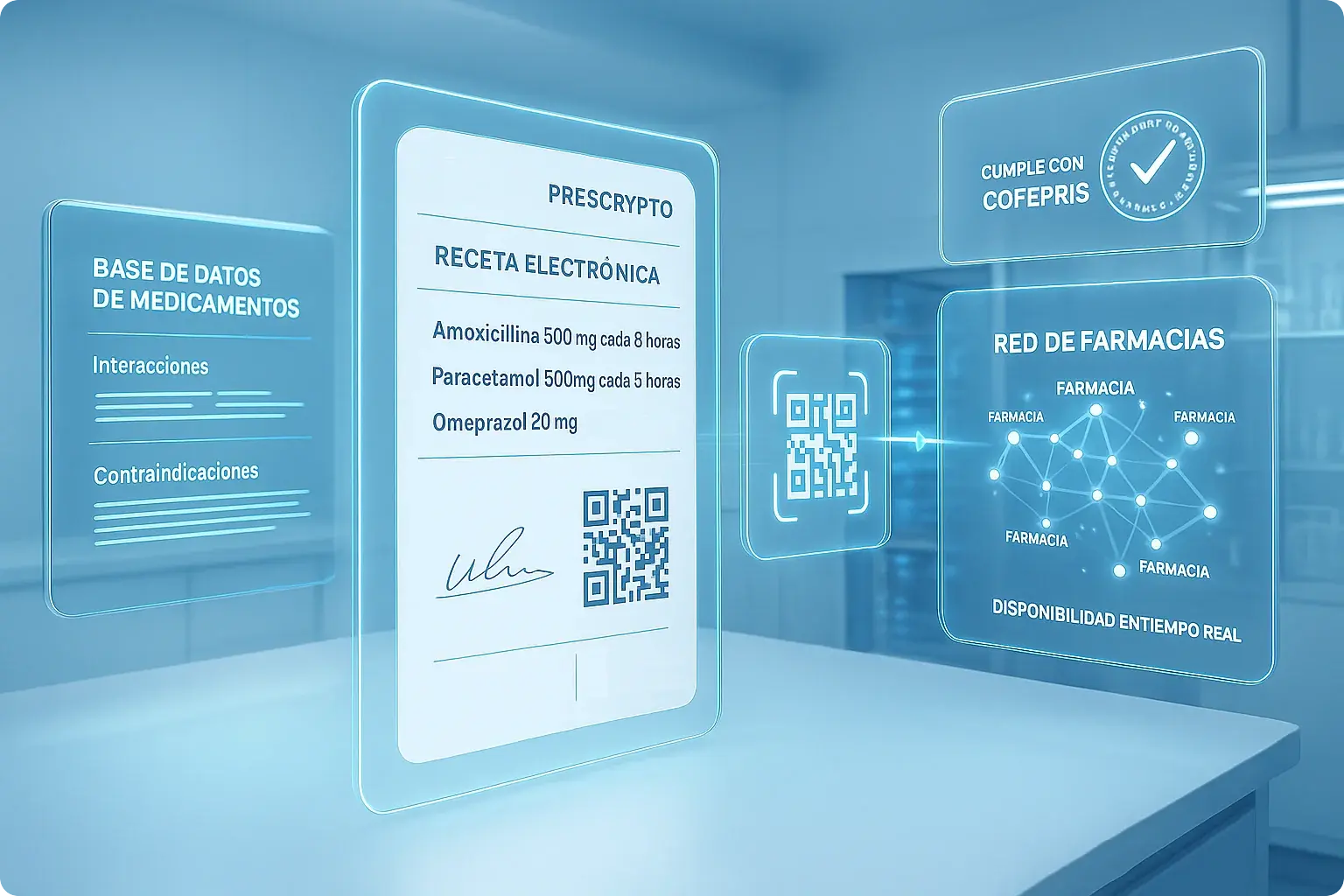
Write prescriptions from the patient chart. They go straight to WhatsApp, work at 15,000+ pharmacies. COFEPRIS compliant. Free with Luna.

Prescrypto
<!-- ═══════════════════════════════════════════════════════════════════════════════ WHY CHOOSE LUNA + PRESCRYPTO — CALLOUT BOX For: https://www.lunasalud.mx/integraciones/prescrypto-receta-electronica Suggested placement: After the intro section, before the video tutorial ═══════════════════════════════════════════════════════════════════════════════ INSTRUCTIONS: 1. Ensure Baloo 2 font is loaded on the page. If not already in Webflow: Project Settings > Fonts > Add Google Font: Baloo 2 (weights: 400, 500, 600, 700, 800) Or add to page Head Code: <link href="https://fonts.googleapis.com/css2?family=Baloo+2:wght@400;500;600;700;800&display=swap" rel="stylesheet"> 2. In Webflow, go to the /integraciones/prescrypto-receta-electronica page 3. Add an Embed element where you want the callout to appear 4. Paste this entire code into the embed 5. Publish and verify on staging ═══════════════════════════════════════════════════════════════════════════════ --> <style> /* Google Font Import */ @import url('https://fonts.googleapis.com/css2?family=Baloo+2:wght@400;500;600;700;800&display=swap'); /* ===== PRESCRYPTO CALLOUT SECTION ===== */ .lpc-section { padding: 64px 24px; background: linear-gradient(180deg, #F0F7FF 0%, #FFFFFF 100%); font-family: 'Baloo 2', -apple-system, BlinkMacSystemFont, 'Helvetica Neue', Arial, sans-serif; color: #1A1A2E; line-height: 1.6; -webkit-font-smoothing: antialiased; } .lpc-section *, .lpc-section *::before, .lpc-section *::after { box-sizing: border-box; } /* Outer container */ .lpc-container { max-width: 1000px; margin: 0 auto; background: #FFFFFF; border-radius: 20px; padding: 48px 40px; box-shadow: 0 4px 32px rgba(0, 122, 255, 0.08); border: 1px solid rgba(0, 122, 255, 0.08); position: relative; overflow: hidden; } /* Decorative top gradient bar */ .lpc-container::before { content: ''; position: absolute; top: 0; left: 0; right: 0; height: 4px; background: linear-gradient(90deg, #007AFF 0%, #6366F1 50%, #10B981 100%); } /* Header */ .lpc-header { text-align: center; margin-bottom: 40px; } .lpc-badge { display: inline-flex; align-items: center; gap: 8px; padding: 8px 20px; background: #E8F4FD; border-radius: 100px; font-size: 13px; font-weight: 700; color: #007AFF; text-transform: uppercase; letter-spacing: 1px; margin-bottom: 16px; } .lpc-badge-dot { width: 8px; height: 8px; background: #10B981; border-radius: 50%; animation: lpc-pulse 2s infinite; } @keyframes lpc-pulse { 0%, 100% { opacity: 1; transform: scale(1); } 50% { opacity: 0.5; transform: scale(1.4); } } .lpc-title { font-size: clamp(24px, 4vw, 32px); font-weight: 800; color: #1A1A2E; margin: 0 0 8px 0; letter-spacing: -0.02em; line-height: 1.2; } .lpc-title-highlight { background: linear-gradient(135deg, #007AFF 0%, #6366F1 100%); -webkit-background-clip: text; -webkit-text-fill-color: transparent; background-clip: text; } .lpc-subtitle { font-size: 16px; font-weight: 500; color: #6B7280; margin: 0; max-width: 560px; margin-left: auto; margin-right: auto; line-height: 1.5; } /* 3-Column Grid */ .lpc-grid { display: grid; grid-template-columns: repeat(3, 1fr); gap: 24px; margin-bottom: 40px; } /* Individual Card */ .lpc-card { background: #FFFFFF; border: 1px solid #E5E7EB; border-radius: 16px; padding: 32px 24px; text-align: center; transition: all 0.3s cubic-bezier(0.4, 0, 0.2, 1); position: relative; } .lpc-card:hover { transform: translateY(-4px); box-shadow: 0 12px 32px rgba(0, 122, 255, 0.12); border-color: rgba(0, 122, 255, 0.2); } /* Emoji Icon Circle */ .lpc-card-icon { width: 64px; height: 64px; border-radius: 50%; display: flex; align-items: center; justify-content: center; font-size: 28px; margin: 0 auto 20px; position: relative; } /* Icon color variants */ .lpc-card:nth-child(1) .lpc-card-icon { background: linear-gradient(135deg, #E8F4FD 0%, #D0EAFB 100%); } .lpc-card:nth-child(2) .lpc-card-icon { background: linear-gradient(135deg, #ECFDF5 0%, #D1FAE5 100%); } .lpc-card:nth-child(3) .lpc-card-icon { background: linear-gradient(135deg, #F3F0FF 0%, #E9E4FF 100%); } /* Metric headline */ .lpc-card-metric { font-size: clamp(22px, 3vw, 28px); font-weight: 800; color: #1A1A2E; margin: 0 0 8px 0; line-height: 1.2; letter-spacing: -0.01em; } .lpc-card:nth-child(1) .lpc-card-metric { color: #007AFF; } .lpc-card:nth-child(2) .lpc-card-metric { color: #10B981; } .lpc-card:nth-child(3) .lpc-card-metric { color: #6366F1; } /* Card description */ .lpc-card-desc { font-size: 14px; font-weight: 500; color: #6B7280; margin: 0; line-height: 1.55; } /* CTA Section */ .lpc-cta { text-align: center; } .lpc-cta-btn { display: inline-flex; align-items: center; justify-content: center; gap: 10px; padding: 16px 40px; background: linear-gradient(135deg, #007AFF 0%, #6366F1 100%); color: #FFFFFF; font-family: 'Baloo 2', sans-serif; font-size: 17px; font-weight: 700; border-radius: 100px; text-decoration: none; border: none; cursor: pointer; transition: all 0.3s cubic-bezier(0.4, 0, 0.2, 1); box-shadow: 0 6px 20px rgba(0, 122, 255, 0.35); } .lpc-cta-btn:hover { transform: translateY(-3px); box-shadow: 0 10px 28px rgba(0, 122, 255, 0.45); text-decoration: none; color: #FFFFFF; } .lpc-cta-arrow { transition: transform 0.3s ease; display: inline-flex; } .lpc-cta-btn:hover .lpc-cta-arrow { transform: translateX(4px); } .lpc-cta-note { font-size: 13px; font-weight: 500; color: #9CA3AF; margin: 14px 0 0 0; } .lpc-cta-note svg { width: 14px; height: 14px; vertical-align: -2px; margin-right: 4px; color: #10B981; } /* ===== RESPONSIVE ===== */ @media (max-width: 1024px) { .lpc-section { padding: 48px 20px; } .lpc-container { padding: 40px 28px; } .lpc-grid { gap: 16px; } .lpc-card { padding: 28px 20px; } } @media (max-width: 768px) { .lpc-grid { grid-template-columns: 1fr; gap: 16px; max-width: 400px; margin-left: auto; margin-right: auto; margin-bottom: 36px; } .lpc-container { padding: 36px 24px; } .lpc-header { margin-bottom: 32px; } } @media (max-width: 640px) { .lpc-section { padding: 32px 16px; } .lpc-container { padding: 32px 20px; border-radius: 16px; } .lpc-card { padding: 24px 16px; } .lpc-card-icon { width: 56px; height: 56px; font-size: 24px; margin-bottom: 16px; } .lpc-cta-btn { width: 100%; padding: 16px 32px; } .lpc-subtitle { font-size: 15px; } } </style> <section class="lpc-section" aria-label="Por qué elegir Luna y Prescrypto"> <div class="lpc-container"> <!-- Header --> <div class="lpc-header"> <div class="lpc-badge"> <span class="lpc-badge-dot"></span> Incluido Gratis </div> <h2 class="lpc-title"> ¿Por qué elegir <span class="lpc-title-highlight">Luna + Prescrypto</span>? </h2> <p class="lpc-subtitle"> Recetas electrónicas sin costo extra, sin papel y sin complicaciones — directo desde el expediente clínico. </p> </div> <!-- 3 Value Proposition Cards --> <div class="lpc-grid"> <!-- Card 1: Speed --> <div class="lpc-card"> <div class="lpc-card-icon">⏱️</div> <p class="lpc-card-metric">30 segundos</p> <p class="lpc-card-desc">Genera una receta completa en lugar de 5 minutos escribiendo a mano</p> </div> <!-- Card 2: Cost --> <div class="lpc-card"> <div class="lpc-card-icon">💰</div> <p class="lpc-card-metric">$0 adicional</p> <p class="lpc-card-desc">Prescrypto incluido gratis en todos los planes de Luna</p> </div> <!-- Card 3: Reach --> <div class="lpc-card"> <div class="lpc-card-icon">🏥</div> <p class="lpc-card-metric">15,000+ farmacias</p> <p class="lpc-card-desc">Tu paciente surte en cualquier farmacia de México</p> </div> </div> <!-- CTA --> <div class="lpc-cta"> <a href="https://account.lunahealth.app/register?language=es" class="lpc-cta-btn"> Empezar Prueba Gratis <span class="lpc-cta-arrow"> <svg xmlns="http://www.w3.org/2000/svg" fill="none" viewBox="0 0 24 24" stroke="currentColor" stroke-width="2.5" width="18" height="18"> <path stroke-linecap="round" stroke-linejoin="round" d="M17 8l4 4m0 0l-4 4m4-4H3" /> </svg> </span> </a> <p class="lpc-cta-note"> <svg xmlns="http://www.w3.org/2000/svg" fill="none" viewBox="0 0 24 24" stroke="currentColor" stroke-width="2"> <path stroke-linecap="round" stroke-linejoin="round" d="M9 12l2 2 4-4m5.618-4.016A11.955 11.955 0 0112 2.944a11.955 11.955 0 01-8.618 3.04A12.02 12.02 0 003 9c0 5.591 3.824 10.29 9 11.622 5.176-1.332 9-6.03 9-11.622 0-1.042-.133-2.052-.382-3.016z" /> </svg> 14 días gratis · Sin tarjeta de crédito · Cumplimiento COFEPRIS </p> </div> </div> </section>
Free with Luna

Digital prescriptions with Prescrypto

Paper prescriptions are a hassle. Printing, signing, patients losing them. With Luna's Prescrypto integration, you generate a digital prescription in 30 seconds. The patient gets it on WhatsApp. They show their phone at any of 15,000+ pharmacies in Mexico. Done.

🏥 Works at pharmacies nationwide

  • Big chains: Farmacias del Ahorro, Guadalajara, Benavides
  • Hospital pharmacies
  • Delivery pharmacies (patients don't even have to leave home)
  • Real-time stock checking at some locations

🔒 Fully COFEPRIS compliant

  • 🔐 Your digital signature—legally valid, fully authenticated
  • 🔐 QR code on every prescription—impossible to forge
  • 🔐 Complete audit trail—traceable from your clinic to the pharmacy
  • 🔐 Controlled substance validation—automatic regulatory checks

💊 Especially useful for...

🛡️ Controlled medications

Prescribing controlled substances used to mean special forms and extra paperwork. Now it's just a few clicks, with COFEPRIS validation built in. The system won't let you prescribe something that violates regulations.

🔄 Chronic conditions

Patients with diabetes, hypertension, or other ongoing conditions need regular refills. Instead of coming in just for a prescription, you can renew it digitally. They get the WhatsApp, go to the pharmacy, done.

🎥 Watch how it works

Here's a quick walkthrough of generating a digital prescription from a patient's chart:

What you'll see:

  • Setting up your professional credentials (one-time)
  • Creating a prescription from the patient chart
  • Adding medications with dosage and instructions
  • How patients receive and use the prescription

Why Prescrypto?

Prescrypto is the leading e-prescription platform in Mexico. We partnered with them so you get all their capabilities without paying extra or managing another account.

50,000+ Doctors already using it
15,000+ Pharmacies in the network
100% COFEPRIS compliant
Try Luna Free →

✓ 14 days free · No credit card · COFEPRIS compliant

Questions people ask

What exactly is Prescrypto?
Prescrypto is Mexico's largest electronic prescription network. They connect doctors with over 15,000 pharmacies. Every prescription includes a digital signature, QR code, and meets all COFEPRIS requirements. Luna integrates directly with their system.
Does this cost extra?
No. Prescrypto is included free in every Luna plan. Generate as many prescriptions as you need—no per-prescription fee, no limits.
Which pharmacies accept these prescriptions?
Over 15,000 across Mexico. That includes major chains like Farmacias del Ahorro, Guadalajara, and Benavides, plus hospital pharmacies and many independent stores. Patients just show the QR code on their phone.
How long does it take to create a prescription?
About 30 seconds. From the patient's chart, click "New prescription," add the medications with dosage, hit send. The patient gets it instantly on WhatsApp and email.
Are these legally valid for controlled substances?
Yes. Prescrypto prescriptions meet all COFEPRIS requirements for controlled substances. The system automatically validates that what you're prescribing complies with regulations. Everything is tracked and auditable.

How to Create Digital Prescriptions

Luna connects to Prescrypto behind the scenes, so you can issue legally valid electronic prescriptions without leaving the patient's chart. No separate login, no extra software. Here's how it works.

🧩 The short version

Luna talks to Prescrypto automatically. You don't need a Prescrypto account—we use your Luna credentials (professional license, RFC, email) to set everything up when you create your first prescription.

  • Your prescription gets validated and digitally signed
  • Prescrypto generates an official PDF with a QR code
  • Patient receives it via WhatsApp and email—instantly

📝 Step by step

1

Open the patient's chart

Go to the appointment or patient profile where you want to write the prescription.

2

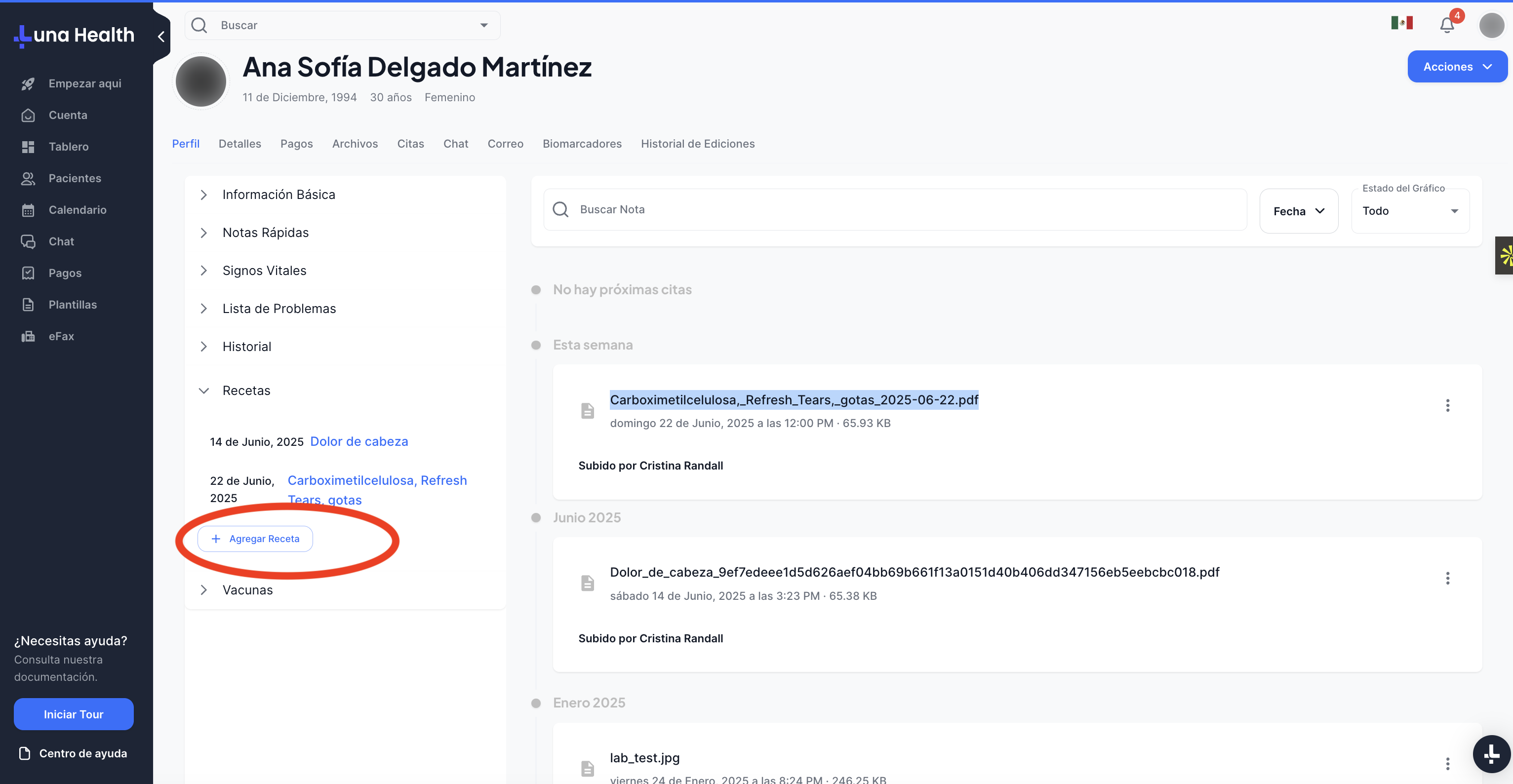
Click "New prescription"

You'll find this in the notes section or prescription tab. Hard to miss.

Screenshot showing the New prescription button in Luna
3

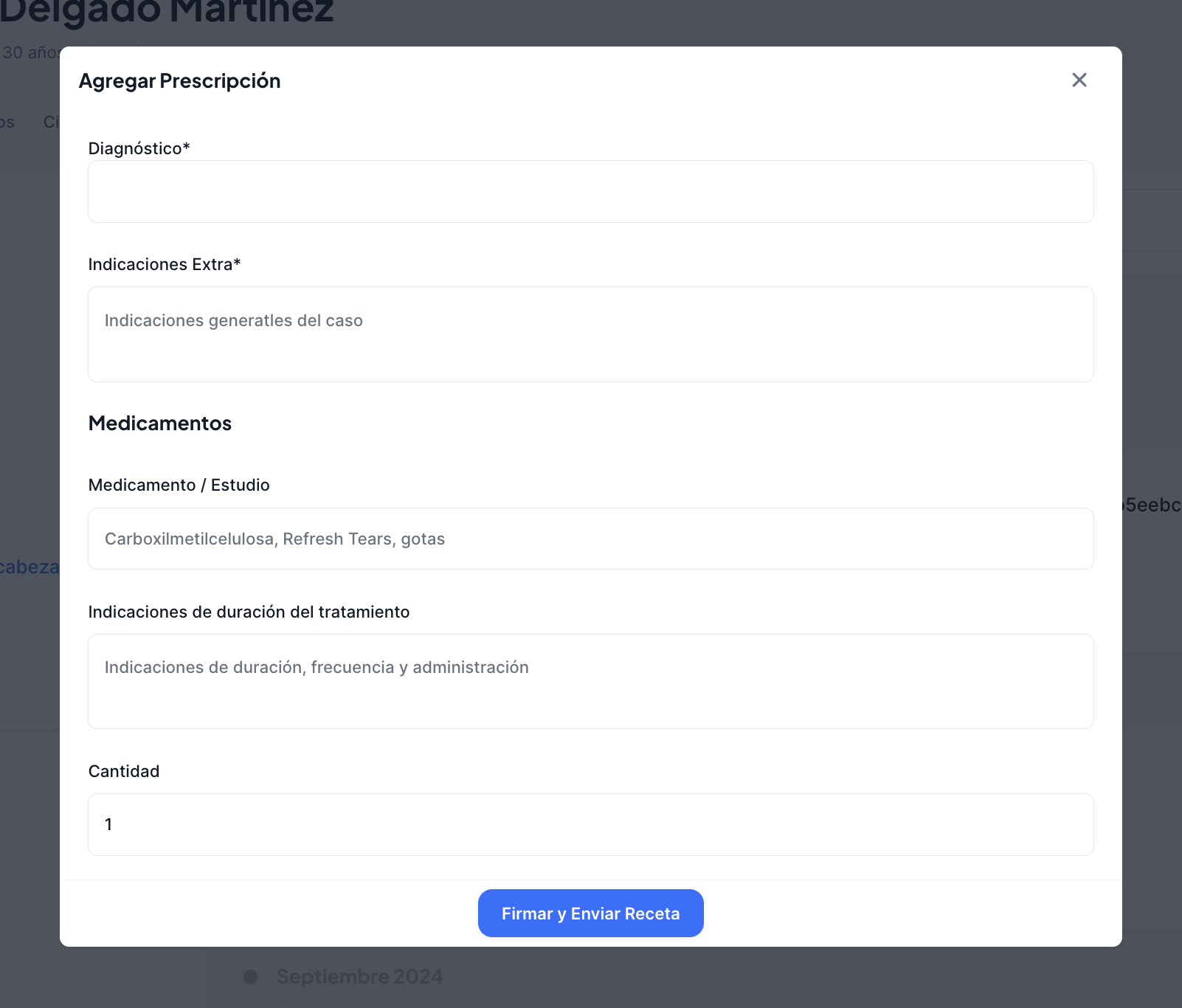
Add medications

Enter the drug name, dosage, frequency, and duration. Add any special instructions the patient needs to follow.

Screenshot showing the medication form in Luna
4

Hit "Send"

This triggers the digital signature and sends the prescription to Prescrypto for validation.

5

Patient gets it immediately

They receive a WhatsApp message and email with the prescription. The QR code on it works at any participating pharmacy.

⏱ First-time setup (one-time thing)

The very first time you create a prescription, Luna will ask you to verify some professional details—your cédula, RFC, that kind of thing. This gets sent to Prescrypto for verification, which usually takes under 48 hours.

✅ After that, it's instant

Once you're verified, prescriptions go out in seconds. No waiting, no approval delays. Just write it and send it.

🏥

Where can patients fill these?

Pretty much anywhere. Prescrypto works with over 15,000 pharmacies across Mexico—big chains, hospital pharmacies, local stores. The patient just shows the QR code on their phone. No printing required.


See the full pharmacy list →

📌 What you'll need

🎓
Your professional license (cédula)
🏛️
RFC (Mexican tax ID)
📧
Email address
🌐
Internet connection

Need help getting set up?

If you're stuck on the verification step or have questions about e-prescriptions, reach out. We'll get you sorted.